
At a glance
- Game format
- Fishing arena with 6 cannon positions
- Help access
- Left purple arrow, then the ? icon
- Reward chart
- 14 ordinary targets, bubble groups and variable-value targets
- Published odds
- Capture probability, RTP and expected return are not stated
At a glance
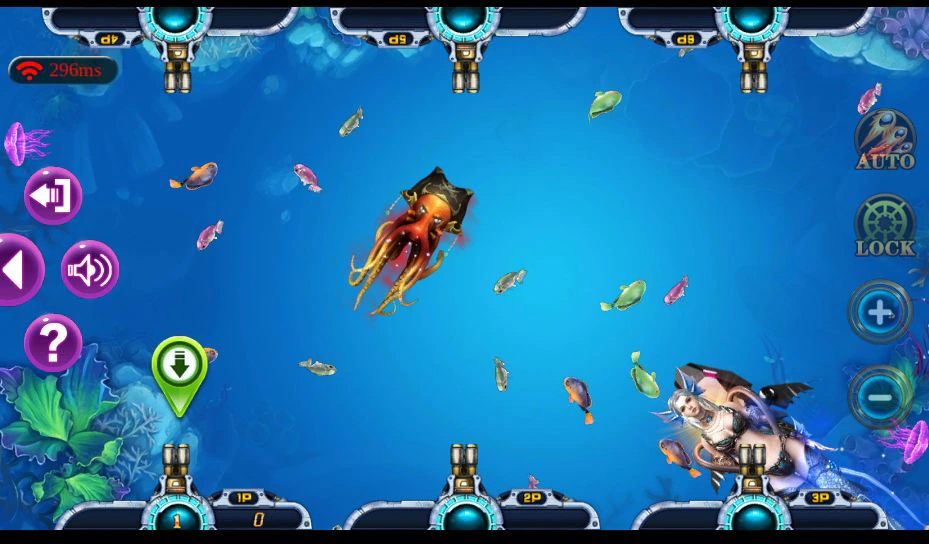
HaiDiLao is a fishing game. The player has six cannon positions, three along the upper edge and three along the lower edge, around a shared underwater arena. Fish and larger illustrated targets move through the center. The core objective is to use a cannon to capture targets for the rewards assigned to them.
Find Help and identify the controls
Expand the purple arrow on the left, then select the ? icon to open Help. The adjacent speaker icon controls sound, and the exit icon returns from the game. Close Help with the red X in its upper-right corner.
The right side has AUTO, LOCK, plus and minus controls. AUTO indicates an automatic-play option, LOCK a locking option, and plus/minus adjustment controls. The Help page does not describe their exact operation: it gives no firing sequence, lock procedure, adjustment step or charge per action. Check the current player settings and displayed amounts before using them.
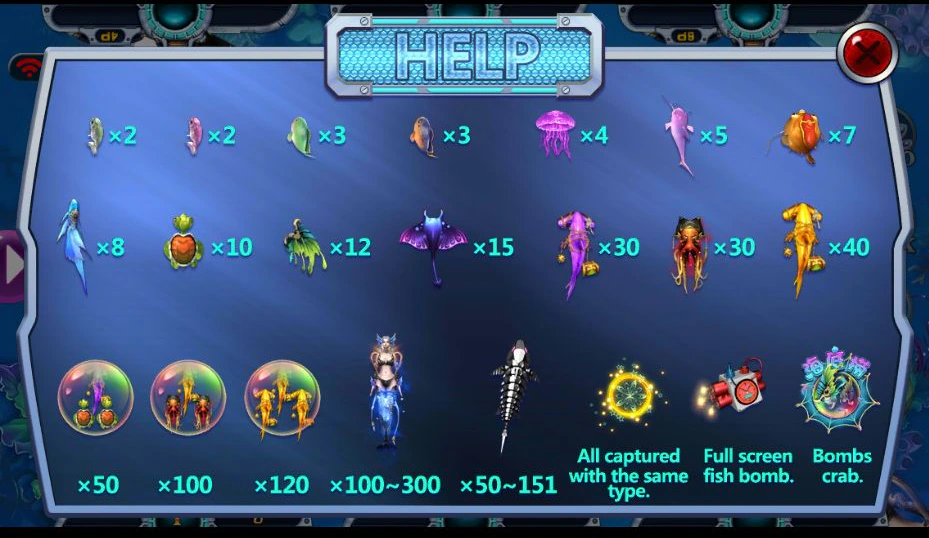
Ordinary target reward values
Help has fourteen target pictures in two rows. Count from left to right within each row to find a target’s value.
| Help position | Visible target | Value shown |
|---|---|---|
| Upper row, 1 | Small silver fish | ×2 |
| Upper row, 2 | Small pink fish | ×2 |
| Upper row, 3 | Green oval fish | ×3 |
| Upper row, 4 | Orange and dark fish | ×3 |
| Upper row, 5 | Purple umbrella-shaped creature | ×4 |
| Upper row, 6 | Pink long-tailed fish | ×5 |
| Upper row, 7 | Round orange fish | ×7 |
| Lower row, 1 | Long blue fish with a pointed head | ×8 |
| Lower row, 2 | Round orange center with green outer parts | ×10 |
| Lower row, 3 | Green creature with trailing appendages | ×12 |
| Lower row, 4 | Blue and purple wing-shaped creature | ×15 |
| Lower row, 5 | Purple creature with gold accents | ×30 |
| Lower row, 6 | Orange and dark tentacled creature | ×30 |
| Lower row, 7 | Long golden fish | ×40 |
Bubble groups and variable-value targets
The bottom of Help contains five more reward illustrations:
| Illustration, from left to right | Value shown |
|---|---|
| First bubble group | ×50 |
| Second bubble group | ×100 |
| Third bubble group | ×120 |
| Female figure with a blue fish body | ×100 to ×300 |
| Black-and-white skeletal fish | ×50 to ×151 |
The two ranges show that those target values can vary. Help does not explain how a value within either range is chosen.
Special labels and terms
The three illustrations at the bottom right have these English labels:
- All captured with the same type: the label refers to capturing targets of the same type.
- Full screen fish bomb: the label names a bomb effect for fish across the screen.
- Bombs crab: the label identifies the illustrated crab with bombs.
Help does not specify how to activate these effects, their costs or which targets qualify. The labels alone do not establish that every target will be captured.
A cannon is the player’s firing position. A target is a fish or other illustrated creature in the arena. Capture is the successful result that earns a target reward. The × mark is a multiplier notation in the reward chart; its calculation base is unspecified.
Rewards and capture probability
A larger reward value describes an award, without showing how likely capture is. For example, ×30 is not a 30% chance. The Help publishes no capture probability, RTP (return to player over many actions) or expected return.
It also leaves the reward base and action charges unexplained. You cannot calculate a cash payout or net return from the reward chart alone. If the player displays credits, check their denomination and the actual amounts shown; credits do not automatically mean dollars.
Browse the Jack 2 Win game guides or compare HaiDiLao’s fishing format with Nv Xia.
FAQ
About HaiDiLao
How do I open HaiDiLao's Help?
Expand the purple arrow on the left side of the fishing arena, then select the ? icon. The Help panel closes with the red X at its upper-right corner.
What does a reward value such as ×30 mean?
It is the reward value marked beside that target in Help. The page does not define the base used to calculate it. It does not mean a 30% capture chance, and cannot by itself establish a cash payout.
What do AUTO, LOCK, plus and minus do?
These controls are visible on the right side of the player. Their labels indicate automatic play, locking and adjustment, but the captured Help does not explain the firing sequence, lock procedure, adjustment increments or billing.
Does HaiDiLao publish capture probability or RTP?
The captured Help page does not state capture probability, RTP or expected return. Its reward chart gives target values without telling you how often targets are captured.
Official game source
The player has a single visible Help page, opened from the left-side menu.
HaiDiLao in-game HelpSource reviewed: